

TECH GUIDE
RunLessWire Wireless Range: How Far Can Your Switches Really Reach?
What the numbers mean in a real home, what weakens the signal, and how to place your switch and receiver for a solid connection every time.
By RunLessWire | November 2026
“How far will it reach?” is one of the first questions people ask about a wireless switch — and a fair one. You want the switch at the top of the stairs to work every time, not just most of the time. Here’s an honest look at RunLessWire’s range, what affects it inside a real home, and how to set things up so the signal is never in doubt.
1. The Short Answer: 50 to 150 Feet
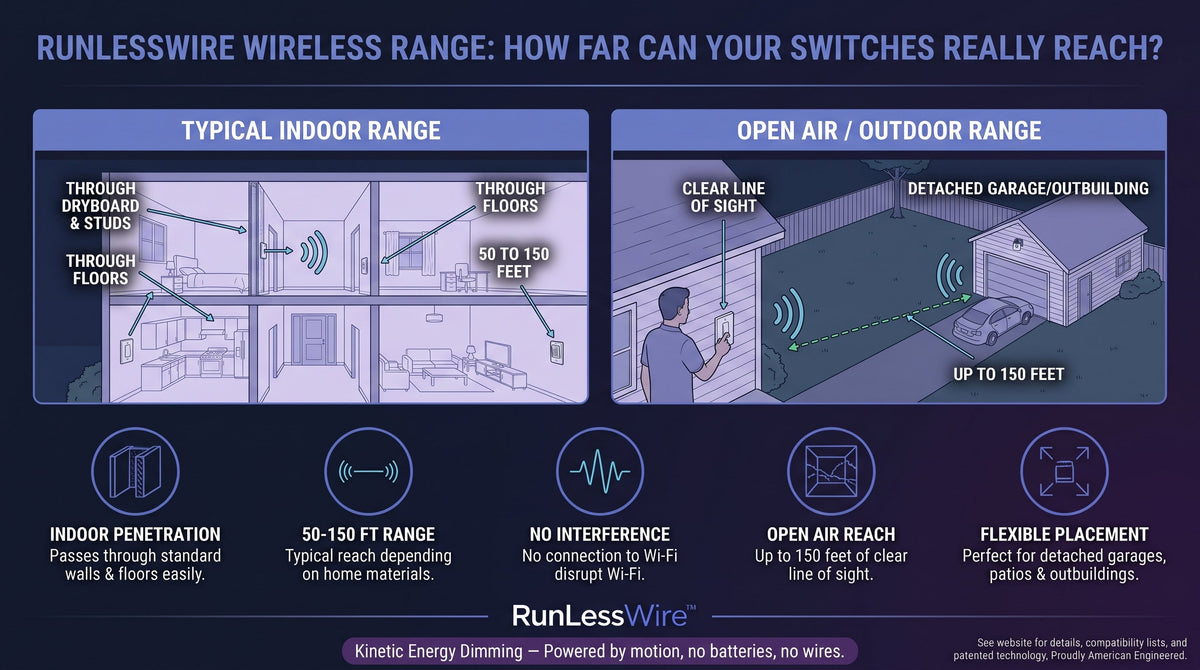
RunLessWire switches reach their receivers from 50 to 150 feet, depending on the walls and other barriers between them. That’s a range rather than a single number because every home is built differently. A switch two rooms away through drywall behaves very differently from one on the far side of a brick wall. For most single-family homes, that range comfortably covers a switch anywhere on the same floor as the light.
2. What Weakens the Signal
Wood framing, drywall, doors, and furniture barely slow the signal down. Denser materials — brick, stone, concrete block, and poured concrete floors — absorb more of it. Older homes deserve a note: plaster walls are often built over a metal mesh called lath, which can cut range noticeably. And metal is the biggest obstacle of all. Appliances, metal junction boxes, foil-backed insulation, ductwork, and large mirrors can all block or reflect the signal.
3. Place the Receiver Smart
The receiver can usually go at either the existing switch box or the light fixture. If your new switch will be far away, choose whichever location puts fewer walls — and less metal — between the two. Avoid sealing the receiver inside a fully metal enclosure when you have a choice. A plastic box or a fixture canopy lets the signal in far more easily.
4. Place the Switch Smart
Because RunLessWire switches are self-powered, you can mount them almost anywhere — drywall, wood, tile, glass, or a cabinet side. Just keep them off large metal surfaces like a refrigerator door, a steel door, or a metal backsplash, which can smother the signal right at the source. If a spot is borderline, moving the switch even a foot or two away from metal often makes the difference.
5. Test Before You Commit
The easiest way to know a location works is to try it. Every kit ships pre-linked, so once the receiver is powered, hold the switch exactly where you plan to mount it and press it several times. If the light responds reliably every time, mount it. If not, try a slightly different spot before you use the Command Strips. A minute of testing saves peeling and remounting later.
6. If the Signal Comes Up Short
Start with the simplest fixes. Move the switch away from nearby metal, or try the receiver at the other possible location — fixture instead of switch box, or the reverse — to shorten the path. Clearing a direct line through a doorway can help too. And don’t worry about your neighbors: every switch has a unique digital ID, so overlapping ranges never cause interference.
Range You Can Count On
In everyday homes, range is rarely the limiting factor — placement is. Mind the metal, test before you mount, and your switches will work exactly where you put them. Explore our Wireless Switch Kits to find the right setup for your space.
Every RunLessWire product is engineered and assembled in the USA, backed by a 5-year warranty, and built to last 20+ years.
No wires. No batteries. No limits.
Ready to put a switch where you need it?
Explore our full product line at runlesswire.com
or find us on Amazon and Home Depot.

Leave a comment
All comments are moderated before being published.
This site is protected by hCaptcha and the hCaptcha Privacy Policy and Terms of Service apply.