

TECH GUIDE
Understanding LED Driver Compatibility with Wireless Dimmers
How to pick LEDs and drivers that play nicely with your wireless dimmer — and avoid the flicker, buzz, and dropout of a mismatched setup.
By RunLessWire | June 2026
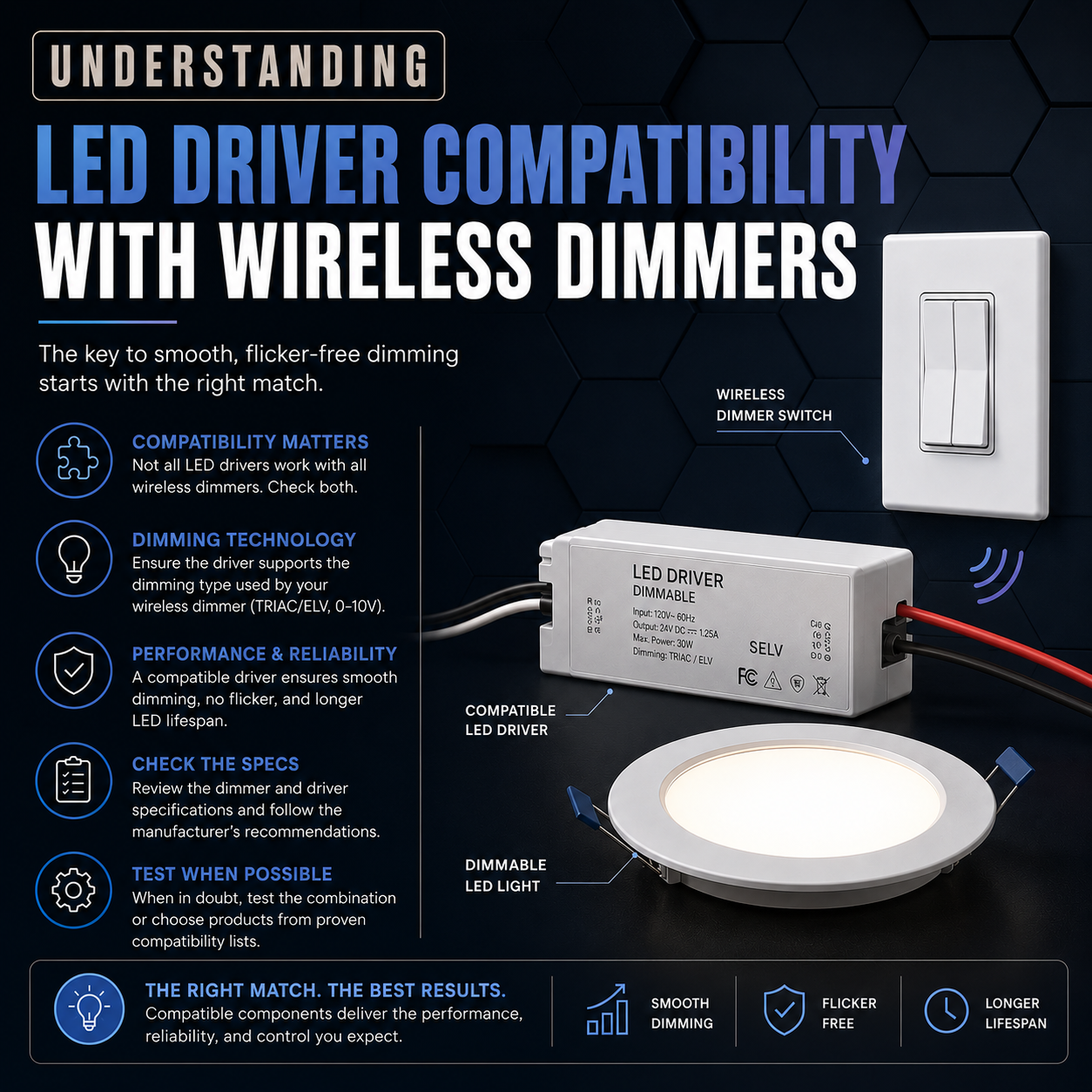
Wireless dimmers make it easy to tune a room’s mood from anywhere — no rewiring required. But pair the wrong LED light with any dimmer and you’ll know it within a second: flickering, buzzing, sudden cutouts, or a range where the bulb blasts at full or refuses to come on at all. Most of the time, the fix isn’t a different switch — it’s understanding how LED drivers and dimmers talk to each other. Here’s what to check.
1. What a LED Driver Actually Does
LED bulbs and fixtures don’t run on standard wall voltage. They need low-voltage DC, and the part that converts your 120V AC mains power into the right current for the LEDs is called the driver. In a screw-in LED bulb, the driver is built in. In recessed cans, strip lights, and many fixtures, the driver is a separate component — and that’s where most dimming compatibility questions come from.
2. Why Dimming LEDs are Different
Traditional dimmers were built for incandescent bulbs, which simply got brighter or dimmer as more or less voltage reached the filament. LEDs don’t work that way. The driver has to interpret the dimmer’s signal — usually a chopped portion of the AC waveform — and translate it into a smooth current change. If the driver can’t read the dimmer’s signal cleanly, you get the symptoms above. Compatibility isn’t about voltage; it’s about how the two devices communicate.
3. Match the Dimming Method
Two dimming methods dominate residential LED setups: leading-edge (TRIAC) and trailing-edge (ELV). Leading-edge was designed for high-wattage incandescent loads and can struggle with low-wattage LED drivers, often causing flicker and buzz. Trailing-edge is gentler — it cuts the end of the waveform instead of the beginning — and is widely preferred for modern dimmable LEDs. Many newer LED drivers are labeled ELV-compatible or trailing-edge dimmable. When in doubt, look for that label on the driver’s datasheet or packaging.
4. Check the Wattage Range
Dimmers don’t just have a maximum wattage — they have a minimum, too. Connect a single 6W LED to a dimmer rated for a 40W minimum, and you’ll get flicker or dropout because the load doesn’t draw enough current for the dimmer’s circuitry to function. LED loads run much lower than the incandescents dimmers were originally sized for, so always check both the upper and lower wattage range before you buy.
5. Flicker, Buzz, and Dropout — and What They Mean
Each symptom usually points to a specific cause. Flicker at low brightness means the driver and dimmer aren’t agreeing at the bottom of the range — try a trailing-edge-compatible driver. Audible buzzing typically comes from the driver responding poorly to phase-cut, common with leading-edge dimmers on cheap LED drivers. Sudden dropout at low levels means you’ve hit the minimum-load floor. Diagnosing by symptom narrows the fix to a single component — usually the driver, not the dimmer.
6. A Quick Compatibility Checklist
Before you wire anything up: confirm the bulb or fixture is dimmable — non-dimmable LEDs will flicker or refuse to dim on any dimmer. Check that the driver supports trailing-edge dimming for modern setups. Add up your total LED wattage and make sure it falls inside the dimmer’s range. Check our Dimming Wireless Switch Kits.
Get the Combination Right
LED compatibility looks intimidating from the outside, but most issues come down to three checks: dimmable LEDs, the right dimming method, and a load that fits the dimmer’s range. Get those right and the flicker, buzz, and dropout go away — usually on the first try.
RunLessWire Wireless Switches are engineered to work with the broad range of modern dimmable LEDs you’ll find in residential and light-commercial settings — and like every RunLessWire product, they’re assembled in the USA and backed by a 5-year warranty.
No wires. No batteries. No limits.
Ready to upgrade your lighting?
Explore our full product line at runlesswire.com
or find us on Amazon and Home Depot.

Leave a comment
All comments are moderated before being published.
This site is protected by hCaptcha and the hCaptcha Privacy Policy and Terms of Service apply.